
MapInfo Pro Advanced – pitneybowes
MapInfo Pro Advanced: Raster analysis, redefined.
Visualise and work with raster datasets of virtually unlimited size, without any performance penalty. With the transformative technology in MapInfo Pro Advanced, you’ll create quality visualisations and analyses in record time, while benefiting from all the capabilities of MapInfo Pro
Contact US (Fast Response):
Email : cs@software-original.com
WhatsApp And Call :

0898 180 3131
MapInfo Pro Advanced - pitneybowes
MapInfo Pro Advanced is a new offering from Pitney Bowes that enables GIS analysts to work with “Big Data” in a spatial context. Users will be able to visualize and analyze very large, high resolution and multi-spectral raster data through the interface within MapInfo Pro.
MapInfo Pro
A complete, desktop mapping solution for the geographic information system (GIS) analyst to manage, analyze, visualize, and publish location-based data.
MapInfo Pro Advanced: Raster analysis, redefined.
Visualise and work with raster datasets of virtually unlimited size, without any performance penalty. With the transformative technology in MapInfo Pro Advanced, you’ll create quality visualisations and analyses in record time, while benefiting from all the capabilities of MapInfo Pro
MapInfo Pro Advanced is our premiere 64-bit location intelligence application with a next-generation raster grid visualisation and analysis add-on. With its innovative, patented multi-resolution master (MRR) data format, it can handle datasets at terabyte scale.
Powerful and Flexible
The MRR format gives you the ability to gather and work with data at different resolutions and still generate meaningful analyses. Plus, it's supported in the Standard MapInfo Pro and throughout the Pitney Bowes Location Intelligence suite.
Plus These Outstanding Benefits
- Comprehensive visualisation options (e.g. analytical hill shading)
- Powerful grid analysis (e.g. slope calculation, line-of-sight analysis)
- Advanced grid analysis using an easy-to-use Grid Calculator
- Broad coverage: High quality maps for large parts of the world
- Up-to-date reference maps: The background data is constantly being updated
- Flexible map displays
- Instant customisation
- Robust background maps
- Smarter calculations
This single-seat desktop license allows for perpetual use of the software and includes a one year Subscription and Services package, which provides you with access to any maintenance and upgrade releases, knowledge-base articles, access to the Knowledge Community web to share ideas and best practices and access to a world-class technical support team. Support packages can be renewed annually as desired.
Update your capabilities with our new, powerful tools.
Find, segment and update your data faster and easier with the new SQL Window:
Users can build and save SQL statements and MapBasic scripts. This helps to increase productivity by building, running and reusing scripts.
Enhance your location analytics with customised apps in the Marketplace:
Customised apps are released and updated continuously to help you solve your specific business needs. Need imagery of a specific area? MapInfo Pro Drone is available. Looking for additional special purpose tools? We have an app for that, too.
Make beautiful maps with map layout improvements
Experience crisp new line and fill styles, vectorised legends, faster redraws, snapping and alignment, templates, multipage layouts.
Turn your data into insights using the new heat mapping available within MapInfo Pro:
Start with any file of people, places, or things and visualise the density of the locations as “hot spots” that help you make better decisions. For more power, upgrade to MapInfo Pro Advanced and work with all kinds of raster data using the fast, highly compressed MRR format.
An Overview of MapInfo Pro Advanced
Products affected: MapInfo Pro Advanced™
MapInfo Pro Advanced is an extension to MapInfo Pro developed especially to support raster data visualization and analysis. This new engine revolutionizes the way GIS professionals use grid and imagery data and will dramatically improve efficiency. It is a next generation raster grid-based engine and data format that offers high speed processing without the traditional trade-off in quality.
MapInfo Pro Advanced is a native 64-bit application which takes advantage of a new data storage format, called Multi Resolution Raster (MRR). It also features an easy-to-use new interface that is tightly integrated with MapInfo Pro.
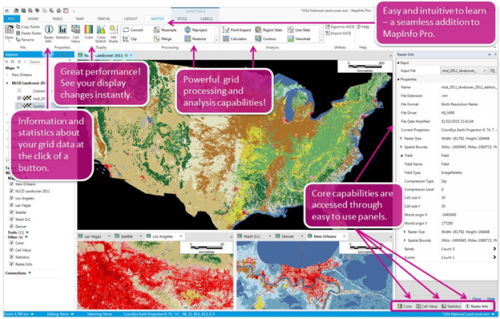
The Multi-Resolution Raster (.MRR) data format provides very high performance with extremely large raster/grid datasets. The limitation is basically disk storage capacity. Grids as large as a terabyte have been tested successfully. The display performance, including pan, zoom, color changes, hill shading changes and even dynamic changes of breakpoints happens nearly instantaneously. This technology supports storage of unified and sparse data. Change in raster data can be handled through this and also helps in efficient memory management.
MapInfo Pro Advanced offers pyramiding, which enables efficient display of data at all zoom levels. It gives support to grid and/or imagery formats.
MapInfo Pro Advanced gives you the ability to process and view data in ways that previously required a number of software packages. A geologist in the field, an exploration manager in head office, or a draftsperson in a regional office can use this product to track settlement activity, contour point data, analyses geographic data, facilitate map creation, easily produce scaled hard copy output, and more.
Easy to Learn and Easy to Use!
MapInfo Pro Advanced is an extension to MapInfo Pro developed especially for high quality raster visualization and analysis.
MapInfo Pro Advanced Capability Overview
View your raster data to reveal information
MapInfo Pro Advanced has great capabilities with powerful display options.
The Color Stretch tool can be used to enhance the display of a raster grid by changing the grid's appearance through data stretches. It is a powerful tool to present data visually. Breakpoints between colors can be set dynamically and you will see the changes in real time.
Enhancing the raster appearance
To improve the aerial photography, Pro users can use the resampling technique and enhance the raster display quality. The resampling methods reduces distortions in the raster data and enhances the display of raster data. Users can notice the difference, when zooming beyond the resolution of the individual pixels in the source raster file. Once the resampling technique on the source raster has been applied, users can zoom in on an area in the raster and see the difference in display quality.
Usually, when zooming beyond 100%, one can see pixelated edges, as displayed below.
When Display Resampling Methods are enabled, raster images will maintain a smooth and high quality appearance even when zooming beyond the resolution of the individual pixels, as displayed below.
The Hill Shade capability enables one to add an illumination effect to a raster map based on the variations in elevation within the map landscape. This tool can easily be used to mimic the sun's effects like illumination, intensity, shadows, etc. on DEMs and other grid files.
A new highlighting feature adds a glossy look and increased contrast to call out the detail in the data.
Working with raster and imagery data
MapInfo Pro Advanced contains many tools for working with raster and imagery data.
The Convert tool is used to convert an input raster dataset into Multi Resolution Raster (MRR) and other raster formats, and this helps to optimize storage.
The Resample tool can be used for classified, numeric grids, MRR grids, MapInfo TAB files, etc. If the source raster is of a classified type, a resampled output in MRR or classified formats can be created.
The Reproject tool changes the projection of a raster dataset from one projection system to another.
In MapInfo Pro Advanced this is done using one of the three Interpolation Methods:
– Nearest Neighbour, Bilinear and Bicubic
The Clip tool is used to extract a portion of the input data based on user defined extent(s). The output will consist of cells that intersect the extent(s).
The Merge tool allows multiple grids to be combined into a single output grid. The Rasterize tool converts a MapInfo TAB file of region/polygon objects into a raster file. The output raster file can be either a numeric or classified grid.
Analysis
The Point Inspection tool can be used to inspect grid files at each point, return the appropriate grid value, and write the value (or values) to a new column(s) in the point table.
The Region Statistics tool inspects the region(s) specified in an input vector file (TAB file) for a set of input raster grid files. Data is aggregated from the grid cells into the regions.
The Line Statistics tool inspects the cell samples along the length of a line and calculates grid statistics for these cells.
In MapInfo Pro Advanced, the Calculator provides a powerful tool for performing multiple tasks on an input raster file or multiple raster files. One can perform mathematical calculations using operators and functions or set up selection queries. Inputs can be Multi Resolution Raster files (.mrr files) or other supported raster formats.
Contouring is an essential part of raster analysis. Contour lines connect a series of points of equal grid values (commonly used with elevation data) and are used to illustrate topography. It allows for vector analysis of the results.
The Cross Section tool creates a profile view (change in grid values) along one or more lines or polylines.
The Viewshed tool identifies all locations on a grid that are visually connected to a single or multiple observer locations. This tool is useful when you want to determine how visible particular places are or if two locations are visible to each other.
The Surface Analysis tool can be used to calculate the slope, aspect, and curvature of an input raster file.
Interpolation - creating raster from points data
MapInfo Pro Advanced simplifies the process of creating raster data from points by using an optimized spatial data analysis system that automatically analyzes the spacing and distribution of the input data and computes a set of default parameters. This allows one to quickly create a raster from virtually any point data with only a minimum of steps. However, if wants or needs to change any of the parameters and specify an exact cell size, search radius, search weighting model etc., then this can easily be accomplished with the advanced options provided on the Create Raster dialog box.
MapInfo Pro Advanced supports the following input file formats for creating a raster surface:
- TAB - MapInfo TAB Files (*.tab)
- LAS - LIDAR ASPERS LAS Files (*.las)
- LAZ - (*.laz)
Multi-file interpolation
Interpolation can be performed on a single input file or multiple input files containing point data. If you want to use a large number of files for interpolation, you can use the Create Raster Multi-file tool.
Create Raster Multi-file - This feature enables one to process large number of files encompassing millions of points in one go. Multi-file Interpolation enables one to directly add one of more folder containing desired files.
An Overview of the Raster GIS capabilities in MapInfo Pro Advanced
Products affected: MapInfo Pro Advanced™
An Overview of the Raster GIS capabilities in MapInfo Pro Advanced
MapInfo Pro Advanced is an extension to MapInfo Pro developed especially for high quality raster visualization and analysis.
This new engine revolutionizes the way GIS professionals use grid and imagery data and will dramatically improve efficiency. It is a next generation raster grid-based engine and data format that offers high speed processing without the traditional trade-off in quality.
MapInfo Pro Advanced is a native 64-bit application which takes advantage of a new data storage format, called Multi Resolution Raster (MRR). It also features an easy to use interface that is tightly integrated with MapInfo Pro.
The Multi-Resolution Raster (.MRR) data format provides very high performance with extremely large raster/grid datasets. The limitation is basically up to that of your disk storage capacity. Here at Pitney Bowes we have tested grids as large as a whole terabyte. The display performance, including pan, zoom, color changes, hill shading changes and even dynamic changes of color breakpoints happens nearly instantaneously. This technology supports storage of unified and sparse data. Change in raster data can be handled through this and also helps in efficient memory management.
MapInfo Pro Advanced offers pyramiding, which enables efficient display of data at all zoom levels. It gives support to grid and/or imagery formats.
MapInfo Pro Advanced gives you the ability to process and view data in ways that previously required a number of software packages. A geologist in the field, an exploration manager in head office, or a draftsperson in a regional office can use this product to track settlement activity, contour point data, analyse geographic data, facilitate map creation, easily produce scaled hard copy output, and more.
Easy to Learn and Easy to Use!
MapInfo Pro Advanced takes full advantage of the new extensibility inherent in the 64 bit version of MapInfo Pro. It is a seamless add-on.
MapInfo Pro Advanced Capability Overview
MapInfo Pro Advanced has great capabilities with powerful display options. The Color Stretch tool can be used to enhance the display of a raster grid by changing the grid's appearance through data stretches. It is a powerful tool to present data visually. Breakpoints between colors can be set dynamically and you will see the changes in real time.
The Hill Shade capability enables one to add an illumination effect to a raster map based on the variations in elevation within the map landscape. This tool can easily be used to mimic the sun's effects like illumination, intensity, shadows, etc. on DEMs and other grid files.
An innovative highlighting feature adds a glossy look and increased contrast to call out the detail in your data.
Multi-spectral imagery that is organized as Fields and Bands can be displayed as desired. There are specific display templates built in for working with Image data as well as data from the Landsat satellites.
Raster Quality options are available to improve the appearance of continuous (numeric) raster datasets.
Creating Grids
Grids can be created in MapInfo Pro Advanced in a number of ways. This includes interpolation and modeling techniques.
Here are two examples. The top example was done using the Inverse Distance Weighting interpolation method. The bottom example was created using Hotspot Density modeling.
Processing
MapInfo Pro Advanced offers a variety of raster data processing capabilities.
The Convert tool is used to convert an input raster dataset into Multi Resolution Raster (MRR) and other raster formats, this helps to optimize storage. The Resample tool can be used for classified, numeric grids, MRR grids, MapInfo TAB files, etc. If the source raster is of classified type, you can produce a resampled output in MRR or classified formats.
The Reproject tool changes the projection of a raster dataset from one projection system to another. In MapInfo Pro Advanced this is done using one of the three Interpolation Methods – Nearest Neighbour, Bilinear and Bicubic. The Clip tool is used to extract a portion of the input data based on user defined extent(s). The output will consist of cells that intersect the extent(s). The Merge tool allows multiple grids to be combined into a single output grid. The Rasterize tool converts a MapInfo TAB file of region/polygon objects into a raster file. The output raster file can be either a numeric or classified grid.
The Combine tool combines multiple raster input files together. The resulting MRR file can be organised into a Field and Band structure as required.
Analysis
The Point Inspection tool can be used to inspect grid files at each point, return the appropriate grid value, and write the value (or values) to a new column(s) in the point table. The Region Statistics tool inspects the region(s) specified in an input vector file (TAB file) for a set of input raster grid files. Data is aggregated from the grid cells into the regions. The Line Statistics tool inspects the cell samples along the length of a line and calculates grid statistics for these cells.
In MapInfo Pro Advanced, the Calculator provides a powerful tool for performing multiple tasks on an input raster file or multiple raster files. One can perform mathematical calculations using operators and functions or set up selection queries. Inputs can be Multi Resolution Raster files (.mrr files) or other supported raster formats. A dedicated article on using the Grid Calculator is available.
Contouring is an essential part of raster analysis. Contour lines connect a series of points of equal grid values (commonly used with elevation data) and are used to illustrate topography. It allows for vector analysis of the results.
The Cross Section tool creates a profile view (change in grid values) along one or more lines or polylines. The Surface Analysis tool can be used to calculate the slope, aspect, and curvature of an input raster file.
The Cross Section tool creates a profile view from a line or polyline. The graph in the upper right represents the change in elevation of the line seen in the map.
The Viewshed tool identifies all locations on a grid that are visually connected to a single or multiple observer locations. This tool is useful when you want to determine how visible particular places are or if two locations are visible to each other.
And there’s more!!
More detail can be found in additional articles!
Summary
MapInfo Pro Advanced is an innovative, powerful and easy to use add-on for MapInfo Pro that provides raster grid based capabilities. In future articles we will cover capabilities in more detail.
Do you have the latest version of MapInfo Pro?
If you are trying MapInfo Pro for the first time, after installing the trial go to the PRO tab and click on the Licensing page to start up a trial of the raster GIS capabilities in MapInfo Pro Advanced.
How to determine the type of license you have for your MapInfo Professional
Read the below paragraphs to determine the type of license you have for your MapInfo Pro™ application:
The serial number and access code that you enter during the installation indicates to MapInfo Pro what type of license you have. Depending on the license type, MapInfo Pro will guide you through activating the product (if your organization purchased node-locked licenses) or connecting to a license server (if your organization purchased concurrent or distributable licenses).
MapInfo Pro licenses can be categorized as:
Feature Based Licenses
- Advanced Licenses - If the second character of your serial number is "A", your organization purchased MapInfo Pro Advanced licenses.
- Premium Licenses - If the fourth character of your serial number is "P", your organization purchased Premium licenses. For details on Premium services
- Basic Licenses - If the second character of your serial number is "I" and the fourth character of your serial number is "W", your organization purchased MapInfo Pro Basic licenses
Single-User and Shareable Licenses
- Node-Locked Licenses - If the third character of your serial number is "N", your organization purchased node-locked licenses.
- Concurrent and Borrowable Licenses - If the third character of your serial numberis "S",your organization purchased concurrent licenses. This is the case if MapInfo Pro is installed in a Citrix environment.
- Distributable Licenses - If the third character of your serial number is "D" or if you have limited access to email, then your organization purchased distributable licenses. Your system administrator will provide you with a license server machine name and port number.
MapInfo Pro license serial number is a combination of different licenses described above. For example, if you purchased the Advanced and Premium services of MapInfo Pro to work on a single workstation your serial number would be something like, MANPEW1111111111
Here in the highlighted part of the serial number, "A" stands for Advanced License, "N" for a Node-Locked version and "P" for Premium Services.
Licensing and Activation
The first time you start MapInfo Pro you are asked to activate your product using the serial number and access code you supplied during the installation. This section describes the activation process for the type of license your organization purchased.
To start MapInfo Pro, do one of the following:
• Double-click the MapInfo Pro icon on your desktop.
• From the Start menu, select MapInfo Pro 15.0 from the Selected Program folder.
System Administrators interested in installing and activating licenses silently should refer to the MapInfo Pro Install Guide for these instructions and for Workgroup installation information.
Determine the Type of License you have
The serial number and access code that you enter during the installation indicates to MapInfo Pro what type of license you have. Depending on the license type, MapInfo Pro will guide you through activating the product (if your organization purchased node-locked licenses) or connecting to a license server (if your organization purchased concurrent or distributable licenses).
To determine what type of license you have:
• If the third character of your serial number is "N", your organization purchased node-locked licenses. For activation instructions, see Node-Locked Licenses.
• If the third character of your serial number is "S", your organization purchased concurrent licenses. For activation instructions, see Concurrent Licenses.
• If the third character of your serial number is "D" or if you have limited access to email, or have installed MapInfo Pro in a Citrix environment, then your organization purchased concurrent non-borrowing serial licenses. Your system administrator will provide you with a license server machine name and port number. For activation instructions, see Distributable Licenses.
• If the fourth character of your serial number is “P”, your organization purchased Premium licenses. For details on Premium services, see Premium Services.
Node-Locked Licenses
Node-locked licenses enable you to run MapInfo Pro on a specific computer. If you purchased node-locked licenses, your installation of MapInfo Pro must be activated before you can use it.
Activation is the process of acquiring a license from Pitney Bowes Software. This section explains the activation options available for node-locked licenses.
Advanced Licenses
MapInfo Pro Advanced licenses enable high quality raster visualization and lets you analyze grid-based spatial information. The advanced license extends the capabilities of MapInfo Pro by providing a core raster engine that can be reused across desktop and server products. MapInfo Pro Advanced:
• Enables high performance with very large grid files.
• Efficiently displays data at all zoom levels.
• Supports both numeric and classified data in the same file.
• Supports grid and/or imagery formats.
• Provides high performance analysis, processing and complex workflows using huge raster files which are too large to fit in main memory.
If you have not purchased an Advanced license of MapInfo Pro, only following basic features of the raster engine are available:
• Open any supported raster (MRR, ERS, ASC, GRD, GRC, etc…)
• Raster Info
• Statistics
• Cell Value
• Color Pseudo
• Color RGB
• Color Stretch
• Hill shade
• Convert
• Copy
• Delete
• Rename
If you purchased node-locked licenses, your installation of MapInfo Pro must be activated before you can use it. Activation is the process of acquiring a license from Pitney Bowes Inc.
Note: For Citrix installations, you must use a concurrent license to be in compliance with your licensing agreement.
Specifications
OPERATING SYSTEMS – DESKTOP
– Windows 7 (64-bit SP1)
– Windows 8.1 (64-bit)
– Windows 10 (64-bit)
– Windows 2012 Server R2 (64-bit only)
– Windows 2012 Server R2 (64-bit with XenApp 7.5)
– Windows 2019 Server R2 (64-bit)
– Windows 2019 Server R2 (64-bit with XenApp)
DATA COMPATIBILITY
– Common PC files
– Microsoft® Excel
– Access
– DBF
– CSV and delimited ASCII text files
RELATIONAL AND SPATIAL DATABASES
– Oracle®
– Microsoft® SQL Server
– PostGIS
– SQLite
– ODBC compliant databases
– OGC GeoPackage (new in 16.0)
SPATIAL DATA
– AutoCAD® DXF/DWG
– SHP
– DGN
– GML
– KML
AND MORE
– Maps and imagery
– WMTS (new in 16.0)
– WMS
– WFS (version 2.0 support added)
– CSW
– Aerial images
– Satellite images
– Scanned paper mapes
– Microsoft® Bing maps

Reviews
There are no reviews yet.